
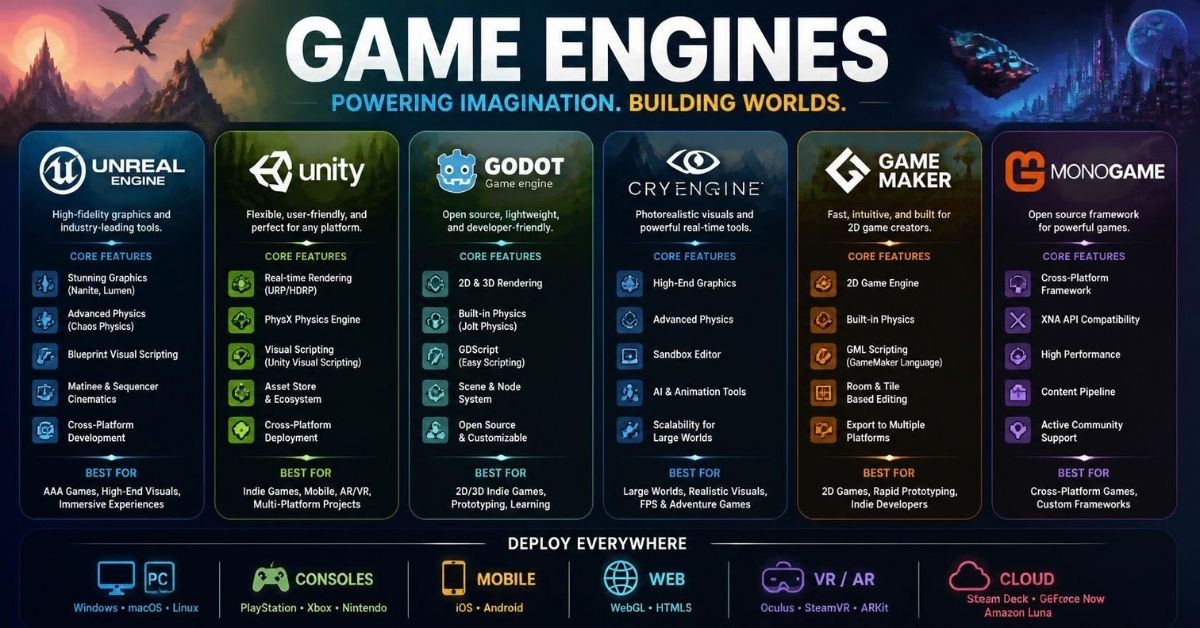
A game engine is an integrated software environment for building interactive 2D and 3D experiences — one that bundles real-time rendering, physics simulation, logic scripting, asset handling and deployment into a single toolset rather than a drawer full of separate programs. Engines target mobile, desktop, console and AR/VR hardware, and the same project files usually serve all of them.
That definition is the industry-standard, vendor-glossary sense of the term: it describes what the software contains, not how fast it runs. If you are picking one to learn or ship with, the two questions that narrow the field fastest are which platforms you actually intend to publish on, and which scripting language you are willing to write.

The Core Systems Inside an Engine
Strip away the branding and most engines are the same handful of subsystems wired together:
- Real-time rendering draws the scene while the project is running, which is what separates an engine from an offline renderer that produces finished frames.
- A physics engine handles object interactions — collisions, gravity, forces — so you describe intent rather than hand-coding every contact.
- A scripting layer lets you write the behaviour that makes a project a game rather than a walkthrough.
- Asset handling and an editor interface tie it together. Import models, textures, audio and animation, drag them into a scene, and iterate without touching the build pipeline.
Vendor glossary pages describe these features qualitatively; they publish no benchmark methodology, test hardware, resolution or settings, so treat any claim about visual quality or physics realism as a feature description rather than a measured result.
Scripting and Cross-Platform Deployment
Scripting Languages
Language choice affects two practical things: how quickly you become productive, and how much existing learning material, sample code and community knowledge transfers to your project.
Unity supports multiple programming languages, including C#, and its flexible scripting is used for custom behaviour. C# is a general-purpose language with documentation and tutorials that exist well beyond game development, which is part of why it appears in so many engine tutorials. The Blender Game Engine took the opposite route: Python handled logic and game mechanics. That made it approachable for beginners already comfortable scripting, but the glossary definition of an expert-level Blender Game Engine developer also expects 3D modelling, texturing and animation skills inside Blender, plus knowledge of real-time rendering techniques, physics simulation and shader programming. In other words, the low entry barrier did not mean a low ceiling for serious work.
What no glossary can tell you is how large any given ecosystem is in absolute terms. Ecosystem size claims are vendor positioning, not measured counts, so weigh them as directional.
Platform Reach
Unity’s cross-platform capability is described as letting developers build once and deploy across numerous platforms, which its vendor material says reduces the time and effort needed for multi-platform releases. That is a benefit statement about the engine’s design, not an independently timed study — the honest reading is that a single project structure can target more platforms, and how much time that saves depends on your project.
The platforms in question are mobile, desktop, console and AR/VR devices. If your target list includes console or VR, confirm platform support and any holder requirements before you commit months to a project; these are the categories where engine support is not uniform.
Beyond Games: AR/VR, Simulation, and Education
Engines are not a games-only tool. Unity lists comprehensive AR and VR support among its key features, and it is widely used for training, visualisation and interactive installations where the output is an experience rather than a shipped title. Blender Game Engine was likewise used for interactive 3D applications including simulations and visualisations — not only games.
Education is the third non-game use. Educational institutions commonly teach game design and development with Unity because of its ease of use and its relevance to what studios use. That makes it a reasonable default for a classroom or a self-taught beginner: the material you find will mostly assume an engine like it.
Who Uses Game Engines — and Which Tier Fits You
Vendor positioning places Unity across the full range, from independent developers and hobbyists to large game studios, with accessibility and scalability pitched as the reason it suits both beginners learning development and professionals with demanding projects.
That framing is useful mainly as a self-identification exercise:
- Student or hobbyist — you want the shortest path from an empty scene to something playable, and you value the volume of beginner material.
- Indie developer or small team — you need to ship on several storefronts and platforms without rebuilding the project per target.
- Studio or technical decision-maker — the engine’s plugin and tooling ecosystem, hiring pool and pipeline integration matter more than the starter tutorial.
These are descriptions of how the tools are marketed and used, not findings from independent user research, so use them to shortlist rather than to decide alone.
Comparing the Main Options: Unity, Unreal, and Godot
Unity, Unreal Engine and Godot are the engines that have been described as offering more robust performance, more advanced features and extensive support communities compared with the now-retired Blender Game Engine.
A Howdy community survey (“Top 5 Game Engines”) reported the following distribution among respondents:
| Engine | Share in Howdy survey |
|---|---|
| Unity | 58.6% |
| Unreal Engine | 7.5% |
| Unreal Engine 5 | 7.5% |
| Blender | 4.3% |
| Construct | 4.3% |
Context matters more than the ordering here. This is a platform-run community survey from Howdy, a hiring platform with a large international developer network — not an independent market study with a published sampling methodology. Read the numbers as a snapshot of one community’s stated preferences, useful for a rough sense of relative mindshare, not as a measure of shipped titles, revenue or technical quality.
The “Unity vs Unreal” comparison is one developers discuss constantly, and you will find no shortage of opinions on which is better for a given genre or team size. Those arguments exist and are worth reading; evaluating them properly needs project-specific criteria rather than a single verdict.
Engine positioning at a glance
| Engine | Best understood as | Watch out for |
|---|---|---|
| Unity | General-purpose 2D/3D engine with broad platform reach including AR/VR | Ecosystem claims are large but unquantified; verify the specific packages you need |
| Unreal Engine | Frequently cited alongside Unity as a high-capability alternative | Not detailed in the available comparison material — investigate directly |
| Godot | Open alternative cited for performance, features and community support | Same caveat: cited as a competitor, not benchmarked here |
| Blender Game Engine | Retired; historical relevance only | Discontinued in 2019 — do not start new projects on it |
Case Study in Discontinuation: Blender Game Engine (1994–2019)
The Blender project began in 1994, and its Game Engine was built to let users create interactive 3D content directly inside Blender, including games, simulations and visualisations.
What it got right: seamless integration with Blender’s modelling and animation tools, genuine ease of use for beginners, and no additional cost.
Where it fell short: limited performance compared with specialised engines, a lack of advanced features, and minimal support for modern graphical techniques.
It was discontinued in 2019, attributed to limited development resources and the emergence of more advanced engines. The exact final version is not something to hang on — the lesson is the pattern.
This is the most concrete longevity risk in engine choice: free and bundled is not the same as supported. An engine can be tightly convenient for the work you are doing today and still reach end of development before your project ships. If you are considering an engine with a small or shrinking contributor base, factor that in deliberately rather than assuming integration will always be an advantage.

Before Engines Were Products: Hard Drivin’ and the Bespoke Era
Modern engines exist because teams once wrote their own for every game. Atari’s Hard Drivin’ is a useful example of that era: an arcade title later ported to many home systems, with community discussion referencing source code for the Amiga, Atari, IBM and Spectrum versions.
A Retrocomputing Stack Exchange question asked how the Hard Drivin’ engine worked — how world data was handled, how collision detection was done — and went unanswered. The only responses were speculative comments about single-tyre car physics and generic collision handling approaches.
That silence is the point. Early arcade engines were built per game, tailored to specific hardware, and their internals were frequently undocumented or lost. We can say bespoke work was the norm and that reconstruction is hard; we cannot honestly present those speculative comments as a description of how the engine worked. When you read confident explanations of 1980s arcade rendering, check whether they are reconstructed from disassembly or inferred from the game’s visible behaviour.
How to Choose an Engine: A Practical Checklist
Work through this in order — the early items eliminate more options than the later ones.
- Target platforms. Does the engine cover every device you actually intend to ship on? Mobile, desktop, console and AR/VR support are not automatic, and console support in particular comes with platform-holder conditions.
- Scripting language. How comfortable are you with C# or Python, and how much of what you already know transfers? A language you can read fluently shortens the first month more than any feature list.
- Assets, plugins and documentation. Pre-made assets, plugins and written guides reduce what you build from scratch. Compare the specific categories you need — character animation, terrain, networking — instead of comparing overall ecosystem size.
- Non-game requirements. If you are building AR/VR or a simulation, prefer an engine that lists that support directly rather than one you plan to bend into shape.
- Longevity risk. The Blender Game Engine’s 2019 discontinuation is the case to keep in mind. Check how active development looks and whether the tooling you depend on is maintained by the engine vendor or by volunteers.
- Iteration and build speed. Vendor material states that integrating Incredibuild with Unity distributes resource-intensive tasks such as rendering and compiling across multiple machines, reducing build times and accelerating iteration cycles. No published benchmark data, hardware, settings or methodology accompanies that claim, so treat build time as a workflow consideration — something to measure on your own project once you have one — rather than a deciding factor.
This checklist is judgement built from how the engines describe their own features, not from hands-on testing of any of them. Used in order, it will get you to a shortlist you can then validate by building the smallest possible version of your actual project.
